
 |
| Home | Features | About | Downloads | Donations | Support Forum | Contact |
|
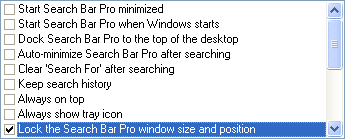 The Lock Search Bar Pro setting locks the current size and position of Search Bar Pro. This setting is useful if you find that you tend to accidently move or resize the bar or just want to make sure it always stays in place.This website design and all content is © 2002 by Patrick Deal.
|
|
|||||||||||||
|
|||||||||||||
|
|||||||||||||
|
|||||||||||||
|
|||||||||||||
|
|||||||||||||
|
|||||||||||||
| This website design and all content is © 2002 by Patrick Deal. |
|||||||||||||
| This website is best viewed using Internet Explorer 6.0, Netscape 6.2+, or Mozilla 1.0+ at a resolution of at least 800x600. | |||||||||||||