Home Features About Downloads Donations Support Forum Contact
Online Help
Online Help
<< Back
Add a new search engine group
A search group let's you perform the same search using multiple search engines at the same time. You can also create a group of URL's run at the same time. When you use a search group, each search engine (or URL) will be opened in a separate browser window.


Step 1
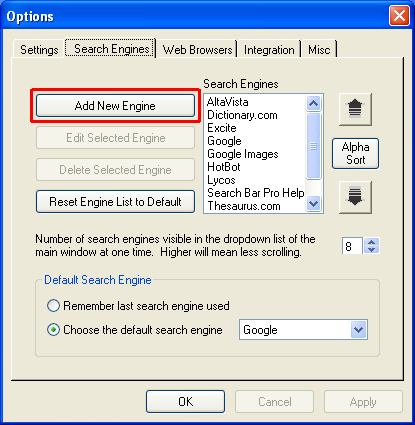
Go to the Search Engines tab in the Options window and click on Add New Engine.


Step 2
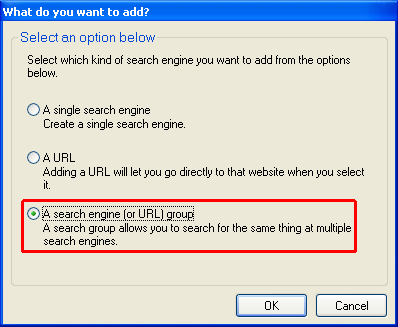
Choose "A search engine (or URL) group" and click OK.


Step 3
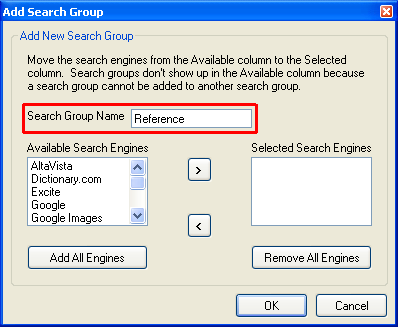
Type the name of the search group in the Search Group Name textbox.


Step 4
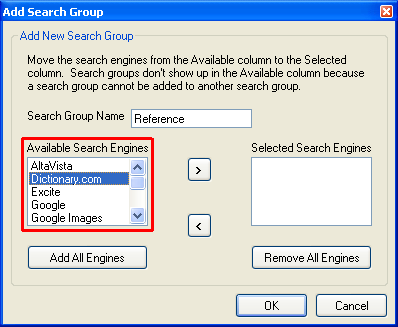
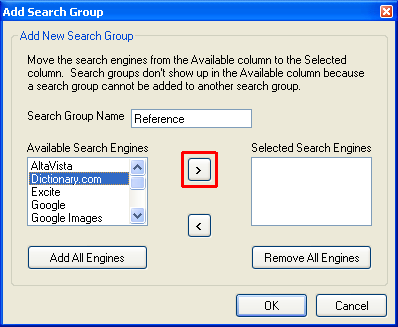
Select a search engine in the Available Search Engines list that you want to add to the search group.


Step 5
Then click the button highlighted in the picture above. This will move the search engine from the Available Search Engines list to the Selected Search Engines list.


Repeat the previous 2 steps for each search engine you want to add to the search group.


Step 6
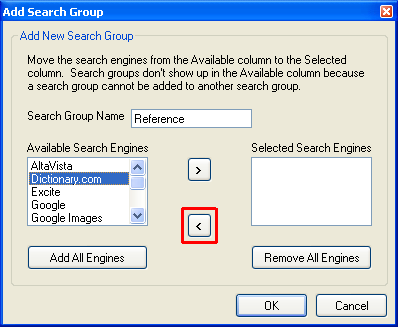
To remove a search engine from the search group, select the search engine in the Selected Search Engines list. Then click the button highlighted in the picture above. This will move the search engine from the Selected Search Engines list to the Available Search Engines list.


Step 7
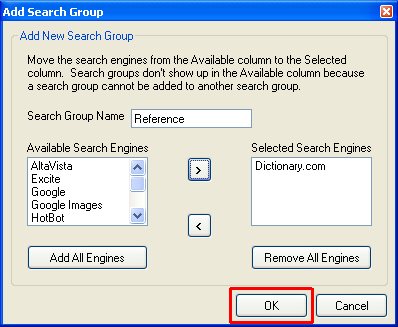
Click OK when you are finished and the search group will be added to the Search Engines list.


 Last Update: 8/15/2003 
This website is best viewed using Internet Explorer 6.0, Netscape 6.2+, or Mozilla 1.0+ at a resolution of at least 800x600.

19