Home Features About Downloads Donations Support Forum Contact
Online Help
Online Help
<< Back
Add a new program
You can configure Search Bar Pro to run a program instead of performing a search. Select which web browser you want to use in the browser list dropdown box, and click Run.


Step 1
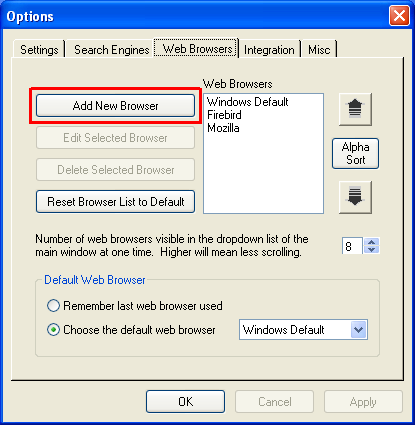
Go to the Web Browsers tab in the Options window and click on Add New Browser.


Step 2
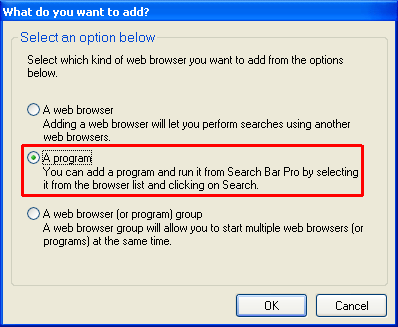
Choose "A program" and click OK.


Step 3
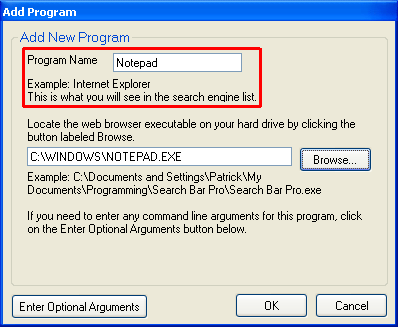
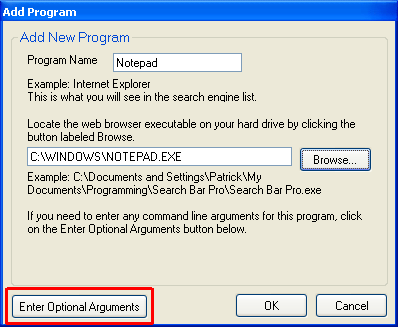
Enter a name for the program.


Step 4
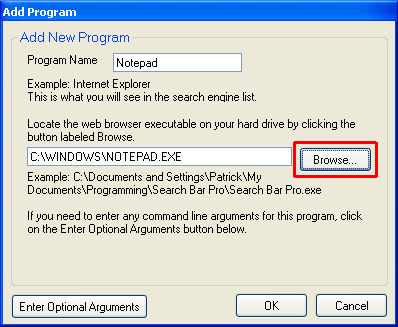
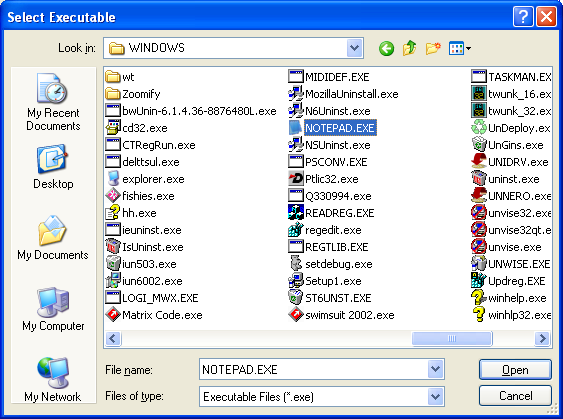
Click the Browse button.


Step 5
Find the program executable file and click Open.


Step 6 (You can skip this step for most programs)
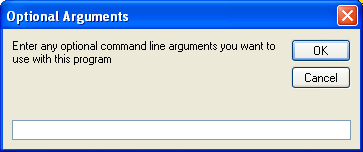
If you need to start the program with command line arguments, click the Enter Optional Arguments button.


Enter any command line arguments you want in this window.

If you add "%1" without the quotes, this has special meaning. Let's say you add Notepad and you added %1 in the optional arguments window. Simply type the path to a file you want to open (such as C:\test.txt) in the Search For textbox, select Notepad in the web browser dropdown list and click Run. This would be the same as if you entered notepad.exe "C:\test.txt" in the Run window.


Step 7
Click on Finish and the web browser will be added to the list.


 Last Update: 1/24/2004 
This website is best viewed using Internet Explorer 6.0, Netscape 6.2+, or Mozilla 1.0+ at a resolution of at least 800x600.

28